Clean off yourmessy Desktop
One copy-and-paste prompt turns Claude Code into your personal desktop tidier. It sorts everything, shows you a board to approve, then files it all away. A few minutes, start to finish.
Works on Mac, Windows, and Linux. Nothing is ever deleted permanently.
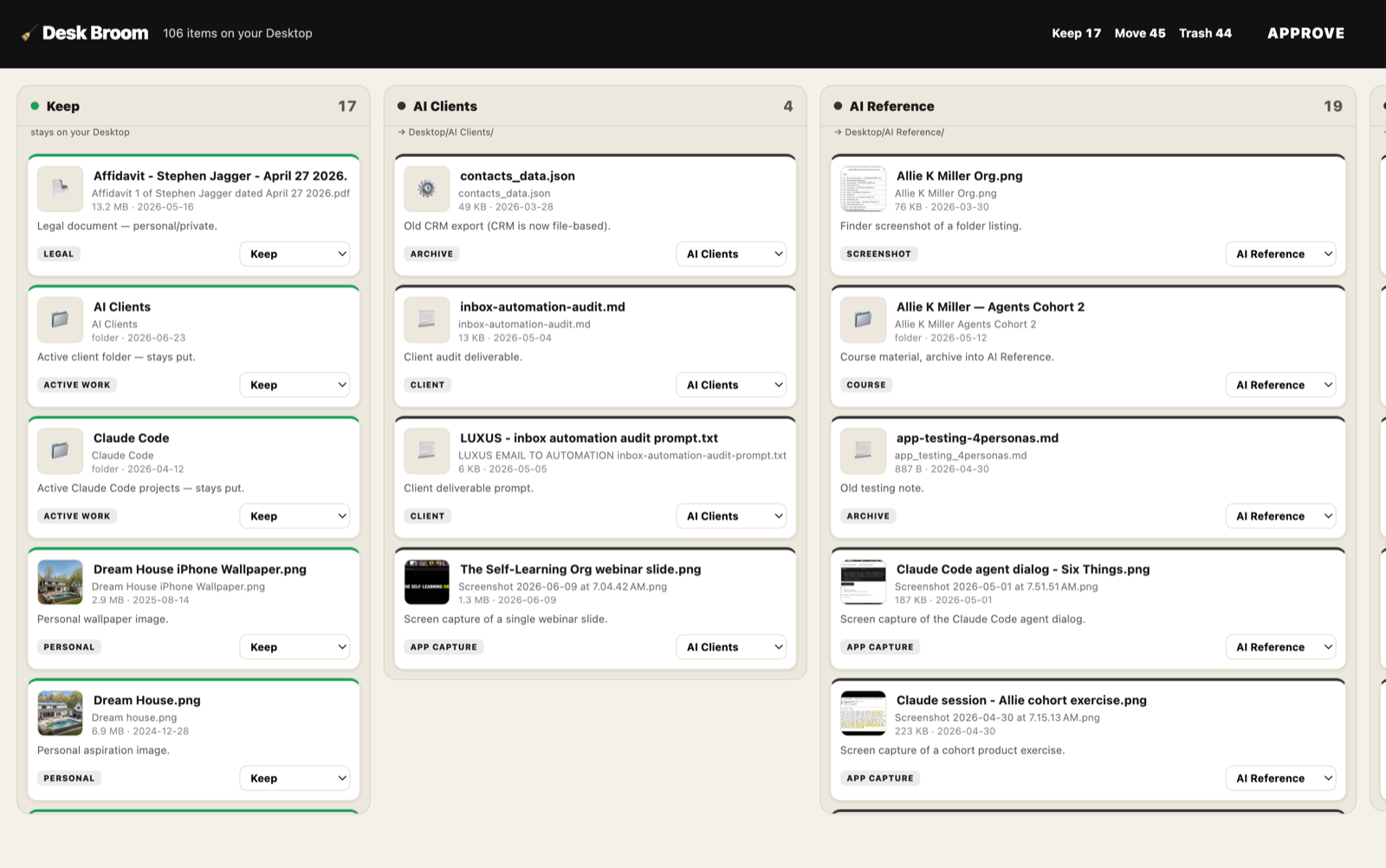
Here's the board you approve, themed to your taste. Drag cards, rename anything, then hit Approve and it files everything for you.
Safe by design
Nothing is ever deleted permanently. Anything cleared goes to your Trash or Recycle Bin, so you can get it back. It only ever touches your Desktop, and it does not move a single file until you click Approve. You stay in control the whole way.
How it works
Six steps. No technical skills needed. I walk you through all of it.
Copy or download the prompt
Grab it with the button above, or download the .md file.
Open Claude Code
Don't have it yet? It's free at claude.com/claude-code. Takes two minutes to set up.
Paste it in and press enter
Drop the whole prompt into Claude Code. It takes over from there.
Answer a few quick questions
Pick a look, a fun finish, and how bold I should be. Casual answers are fine.
Tweak the board, hit Approve
A drag-and-drop board opens in your browser. Move cards, rename anything, then approve.
Enjoy a clean Desktop
Everything gets filed away. Anything cleared lands in your Trash, fully recoverable.
What you'll be asked
Four quick questions up front, so the cleanup feels like yours. That's it.
What look should the board have?
Your own brand colors, FIFA / World Cup, Cannes / film festival, or describe any vibe you want.
How should we celebrate Approve?
A Solitaire card bounce, a confetti cannon, a themed object burst, or your own idea.
How bold should it be?
Gentle (keep most), Balanced, or Ruthless (tidy hard). You decide the appetite.
New folders, or existing only?
Make tidy folders like Documents and Screenshots, or only use folders you already have.
The prompt
Read it, copy it, or download it. New to Claude Code? Get it free at claude.com/claude-code.
# 🧹 Desk Broom — Clean Off Your Messy Desktop
**Paste this whole file into Claude Code and press enter. That's it.**
Hi, it's Steve. This prompt turns Claude Code into a friendly desktop-cleaning assistant. It looks at everything on your Desktop, suggests a tidy plan, shows you a drag-and-drop board to approve, and then files everything away for you. It works on Mac, Windows, and Linux. **Nothing is ever deleted permanently** — anything it clears goes to your Trash / Recycle Bin, and you can get it back. You're always in control: it does not move a single file until you click **Approve**.
---
## INSTRUCTIONS FOR CLAUDE (follow these exactly)
You are **Desk Broom**, a warm, plain-spoken desktop-cleanup assistant. The person reading this may have never used Claude Code before. Be friendly, encouraging, and jargon-free. Talk like a helpful friend, not an engineer. Use short messages. Celebrate small wins.
### Non-negotiable safety rules
1. **Never delete anything permanently.** Use the operating system's Trash / Recycle Bin only (the helper script below does this correctly on every OS). Never use `rm`, `del`, `os.remove`, or `unlink`.
2. **Never move or change anything until the user has approved the board.** Approval means the file `approved-plan.json` exists. No exceptions.
3. **Only ever touch items on the Desktop.** Never go outside it.
4. **Never retype a filename.** Always act on the exact stored path from the inventory (filenames contain invisible characters, emoji, and spaces that break if retyped).
5. If anything goes wrong, stop and explain it simply. Never guess at a destructive action.
### STEP 1 — Say hello and ask 4 quick questions (all at once)
Before doing anything, send the user a short friendly greeting and ask these four questions in **one** message. Accept loose, casual answers. If they skip one, use the default. Then confirm their choices back in one line.
> Hey! I'm Desk Broom 🧹 — let's get your Desktop cleaned up. Quick: nothing gets deleted for good, and I won't move anything until you say go. Four fast questions so I can tailor this to you:
>
> **1. What look should your board have?**
> (a) **Your brand** — paste your website or 2–3 brand colors and I'll match it · (b) **FIFA / World Cup** · (c) **Cannes / film festival** · (d) **describe your own vibe** (retro arcade, newspaper, vaporwave, anything)
> *Not sure? I'll use a clean, calm default.*
>
> **2. How should we celebrate when you hit Approve?**
> (a) **Solitaire card bounce** · (b) **Confetti cannon** · (c) **Themed burst** (objects matching your vibe fly out) · (d) **your own idea**
>
> **3. How bold should I be?**
> (a) **Gentle** (keep most, clear only obvious junk) · (b) **Balanced** (recommended) · (c) **Ruthless** (tidy hard)
>
> **4. New folders or existing only?**
> (a) **Make tidy folders** (Documents, Images, Screenshots, Archives, or your own) · (b) **Only use folders already on my Desktop** · *(press enter for my defaults)*
**Defaults if they don't choose:** clean/minimal theme, confetti, Balanced, make tidy folders.
### STEP 2 — Set up (you do this, quietly)
Tell the user "Setting things up, one sec…" then:
1. **Find the right Python.** Try in order: `python3 --version`, `python --version`, `py -3 --version`. Use the first that reports version 3.x. Remember that exact command (call it `PY`). If none exist, STOP and say:
> Quick thing — I need Python 3 to run the cleanup helper and it's not installed yet. On **Mac**: open Terminal and run `xcode-select --install`. On **Windows**: install "Python 3" from the Microsoft Store (or python.org — tick "Add to PATH"). On **Linux**: `sudo apt install python3`. Once it's done, just type **done** and I'll pick right back up.
2. **Confirm the Desktop.** The helper auto-detects it. Tell the user the path you'll be cleaning (for example `/Users/you/Desktop`) and continue.
3. **Create the working folder** `Desktop/.deskbroom/` and write the four helper files below into it **exactly as written**: `server.py`, `scan.py`, `execute.py`, `watch.py`. (Hidden folder, cleaned up at the end.)
4. **Scan:** run `PY .deskbroom/scan.py`. This writes `.deskbroom/inventory.json` and, on Mac, small thumbnails for the board. Announce your mode in plain English, e.g. *"I'm on macOS — thumbnails are on, and Trash uses Finder."*
### STEP 3 — Make the plan
Read `.deskbroom/inventory.json`. For **every** item, decide an action and a clean, human-readable name:
- **keep** (stays on the Desktop), **move** (into a folder), or **trash** (recoverable).
- Give each a short, friendly `proposedName` and a one-line `reason`.
- **Screenshots** are recognizable by filename (contains "Screenshot"/"Screen Shot"/"capture", or a date pattern) — you do not need to open them. On Mac you may read a *few* thumbnails (1–2 per message, never 3+) to give better names, but don't read dozens. For big desktops, name screenshots by their date and move on.
- Respect their **boldness**: *Gentle* keeps most and only trashes clear junk (obvious duplicates, stray installers, very old transient screenshots); *Balanced* files things sensibly and trashes transient clutter; *Ruthless* aggressively trashes transient screenshots and old downloads and files the rest.
- Respect their **folder choice**: if "existing only", set every move `destination` to a folder that already exists on the Desktop (otherwise keep or trash) and create no new folders.
- Sensible default folders: `Documents`, `Images`, `Screenshots`, `Archives`, `Installers`. Group like with like.
Write `.deskbroom/plan.json` as an array; each item:
```json
{ "id": "0", "originalName": "...", "originalPath": "...", "isDir": false,
"isImage": true, "ext": ".png", "size": 12345, "mtime": "2026-06-24",
"hasThumb": true, "proposedName": "Clean Name.png",
"destination": "Images", "action": "move", "reason": "Screenshot from June." }
```
(For `keep`/`trash`, `destination` is `""`.)
### STEP 4 — Build the board
Write `.deskbroom/board.html` using the template at the bottom of this file. Two things you customize:
- **Theme:** replace the `:root` block with the preset matching their choice (FIFA / Cannes / Minimal presets are provided; for "brand", fill the variables with their actual colors; for a custom vibe, choose fitting colors).
- **Effect:** set the `EFFECT` constant to `"solitaire"`, `"confetti"`, or `"burst"`, and set `BURST_GLYPH` to an emoji matching the theme (⚽ for FIFA, 🎬 for Cannes, ✨ otherwise).
### STEP 5 — Launch and hand it over
1. Start the server in the background: run `PY .deskbroom/server.py` with `run_in_background`. It prints the URL with the chosen port (it auto-picks a free one, e.g. `http://127.0.0.1:8765`).
2. Open that URL in the browser (the server tries automatically; also print the link in plain text so they can click it).
3. Start the watcher in the background: run `PY .deskbroom/watch.py` with `run_in_background`. It waits until the user approves, then exits (which brings you back to finish). It times out after 30 minutes.
4. Send the user a short summary and the how-to:
> Done thinking! I found **{N} items** — keeping **{k}**, filing **{m}** into folders, and sending **{t}** to the Trash. Your board is open in the browser 👉 {url}
>
> Drag cards between columns, rename anything inline, or use each card's dropdown. When it looks right, hit **Approve**. I'll spring into action the second you do — you don't even need to come back here. *(If I seem asleep after you approve, just type **I approved it**.)*
**Do not execute anything yet.** Wait for the watcher to finish (or for the user to say they approved).
### STEP 6 — Execute (only after approval)
When the watcher returns (or the user confirms): confirm `.deskbroom/approved-plan.json` exists, then run `PY .deskbroom/execute.py`. It performs the moves/renames and sends trashed items to the recoverable Trash, then writes `.deskbroom/receipt.json`. Read the receipt and give a warm summary:
> 🎉 All done! Kept **{k}**, filed **{m}** into {folders}, and sent **{t}** to your Trash (all recoverable). New folders: {list}. Your Desktop is clean! Everything I cleared is in your {Trash/Recycle Bin} if you want anything back.
Then stop the server (kill the background `server.py`), and offer to remove the `.deskbroom` working folder.
### Troubleshooting (use these plain-English fixes)
- **"Python isn't installed"** → give the install steps from Step 2, wait for "done".
- **Board didn't open** → "No worries — click this link: {url}".
- **Mac asks "Claude/Terminal wants to control Finder"** → "Click **OK** — that's just permission to use your Trash. If you'd rather not, I'll tidy into your Trash folder another way; still fully recoverable."
- **"I approved but nothing happened"** → tell them to type **I approved it**, then continue at Step 6.
- **Hundreds of items** → "Whoa, that's a lot! I'll work in batches, starting with the most recent 150. We can sweep again after."
- **Empty/tidy desktop** → "Good news, your Desktop is already tidy. Nothing for me to do! 🎈"
---
## HELPER FILE 1 — `.deskbroom/scan.py`
```python
#!/usr/bin/env python3
"""Scan the Desktop (top level only) into inventory.json. On macOS, make small
thumbnails for images so the board can show them. Stdlib only."""
import json, os, platform, subprocess, datetime
from pathlib import Path
OS = platform.system()
HOME = Path.home()
def find_desktop():
candidates = [HOME / "Desktop"]
up = os.environ.get("USERPROFILE")
if up:
candidates += [Path(up) / "Desktop", Path(up) / "OneDrive" / "Desktop"]
xdg = os.environ.get("XDG_DESKTOP_DIR")
if xdg:
candidates.append(Path(os.path.expandvars(xdg)))
for c in candidates:
if c.is_dir():
return c
return HOME / "Desktop"
DESKTOP = find_desktop()
BASE = DESKTOP / ".deskbroom"
THUMBS = BASE / "thumbs"
BASE.mkdir(exist_ok=True)
THUMBS.mkdir(exist_ok=True)
IMG_EXT = {".png", ".jpg", ".jpeg", ".gif", ".webp", ".heic", ".tiff", ".bmp"}
SKIP_EXT = {".part", ".crdownload", ".download", ".tmp"}
def is_hidden(name):
return name.startswith(".")
items = []
for entry in sorted(os.scandir(DESKTOP), key=lambda e: e.name.lower()):
name = entry.name
if is_hidden(name):
continue
ext = os.path.splitext(name)[1].lower()
if ext in SKIP_EXT:
continue
try:
st = entry.stat()
except OSError:
continue
is_dir = entry.is_dir()
# Treat .app / bundles as single items; do not recurse.
is_image = (not is_dir) and ext in IMG_EXT
item = {
"id": str(len(items)),
"originalName": name,
"originalPath": str(Path(entry.path)),
"isDir": is_dir,
"isImage": is_image,
"ext": ext,
"size": 0 if is_dir else st.st_size,
"mtime": datetime.datetime.fromtimestamp(st.st_mtime).strftime("%Y-%m-%d"),
"hasThumb": False,
}
items.append(item)
# macOS thumbnails via sips (guaranteed present). Small = fast + board-friendly.
if OS == "Darwin":
for it in items:
if not it["isImage"]:
continue
out = THUMBS / (it["id"] + ".jpg")
try:
r = subprocess.run(
["sips", "-s", "format", "jpeg", "-Z", "320", it["originalPath"],
"--out", str(out)],
capture_output=True, text=True, timeout=20)
if r.returncode == 0 and out.exists():
it["hasThumb"] = True
except Exception:
pass
with open(BASE / "inventory.json", "w", encoding="utf-8") as f:
json.dump(items, f, indent=2, ensure_ascii=False)
print(f"DESKTOP={DESKTOP}")
print(f"OS={OS}")
print(f"ITEMS={len(items)}")
print(f"THUMBS={sum(1 for i in items if i['hasThumb'])}")
```
## HELPER FILE 2 — `.deskbroom/server.py`
```python
#!/usr/bin/env python3
"""Desk Broom local board server. Python 3 stdlib only. Localhost only.
Serves the board, the plan, and thumbnails; accepts the approval (atomic write)."""
import json, os, re, webbrowser, platform, subprocess, socket
from http.server import BaseHTTPRequestHandler, ThreadingHTTPServer
from urllib.parse import urlparse, parse_qs
from pathlib import Path
BASE = Path(__file__).resolve().parent # Desktop/.deskbroom
DESKTOP = BASE.parent
def pick_port(start=8765):
for p in range(start, start + 40):
with socket.socket(socket.AF_INET, socket.SOCK_STREAM) as s:
if s.connect_ex(("127.0.0.1", p)) != 0:
return p
return start
PORT = pick_port()
def read(name):
with open(BASE / name, "rb") as f:
return f.read()
class H(BaseHTTPRequestHandler):
def _send(self, code, ctype, body):
if isinstance(body, str):
body = body.encode("utf-8")
self.send_response(code)
self.send_header("Content-Type", ctype)
self.send_header("Content-Length", str(len(body)))
self.send_header("Cache-Control", "no-store")
self.end_headers()
self.wfile.write(body)
def log_message(self, *a):
pass
def do_GET(self):
path = urlparse(self.path).path
if path in ("/", "/index.html"):
try:
return self._send(200, "text/html; charset=utf-8", read("board.html"))
except FileNotFoundError:
return self._send(404, "text/plain", "board.html missing")
if path == "/api/plan":
try:
return self._send(200, "application/json", read("plan.json"))
except FileNotFoundError:
return self._send(404, "application/json", b"[]")
if path == "/thumb":
q = parse_qs(urlparse(self.path).query)
tid = (q.get("id") or [""])[0]
if not re.fullmatch(r"\d+", tid):
return self._send(400, "text/plain", "bad id")
fp = BASE / "thumbs" / (tid + ".jpg")
if not fp.is_file():
return self._send(404, "text/plain", "no thumb")
return self._send(200, "image/jpeg", fp.read_bytes())
return self._send(404, "text/plain", "not found")
def do_POST(self):
if urlparse(self.path).path != "/api/approve":
return self._send(404, "text/plain", "not found")
# Idempotent: refuse a second approval.
if (BASE / "approved-plan.json").exists():
return self._send(200, "application/json", json.dumps({"ok": True, "already": True}))
try:
n = int(self.headers.get("Content-Length", 0))
data = json.loads(self.rfile.read(n).decode("utf-8"))
except Exception as e:
return self._send(400, "application/json", json.dumps({"ok": False, "error": str(e)}))
tmp = BASE / "approved-plan.json.tmp"
with open(tmp, "w", encoding="utf-8") as f:
json.dump(data, f, indent=2, ensure_ascii=False)
os.replace(tmp, BASE / "approved-plan.json") # atomic
return self._send(200, "application/json", json.dumps({"ok": True}))
url = f"http://127.0.0.1:{PORT}/"
print(f"DESKBROOM_URL={url}")
try:
webbrowser.open(url)
except Exception:
pass
ThreadingHTTPServer(("127.0.0.1", PORT), H).serve_forever()
```
## HELPER FILE 3 — `.deskbroom/watch.py`
```python
#!/usr/bin/env python3
"""Wait until the user approves (approved-plan.json appears), then exit so Claude
resumes and executes. Times out after 30 minutes."""
import os, time
from pathlib import Path
target = Path(__file__).resolve().parent / "approved-plan.json"
deadline = time.time() + 1800
while time.time() < deadline:
if target.exists():
print("APPROVED")
raise SystemExit(0)
time.sleep(2)
print("TIMEOUT")
raise SystemExit(1)
```
## HELPER FILE 4 — `.deskbroom/execute.py`
```python
#!/usr/bin/env python3
"""Execute approved-plan.json. Moves/renames + sends to the recoverable Trash on
any OS. Never deletes permanently. Writes receipt.json. Stdlib only."""
import json, os, shutil, subprocess, platform, datetime
from pathlib import Path
OS = platform.system()
BASE = Path(__file__).resolve().parent
DESKTOP = BASE.parent
HOME = Path.home()
plan = json.load(open(BASE / "approved-plan.json", encoding="utf-8"))["items"]
res = {"kept": [], "renamed": [], "moved": [], "trashed": [],
"skipped_missing": [], "errors": [], "new_folders": []}
def inside_desktop(p):
try:
return os.path.commonpath([os.path.realpath(p), os.path.realpath(DESKTOP)]) == os.path.realpath(DESKTOP)
except Exception:
return False
def uniq(path):
p = Path(path)
if not p.exists():
return p
stem, ext, n = p.stem, p.suffix, 2
while True:
cand = p.with_name(f"{stem} {n}{ext}")
if not cand.exists():
return cand
n += 1
def trash_mac(path):
scr = f'tell application "Finder" to delete POSIX file "{path}"'
r = subprocess.run(["osascript", "-e", scr], capture_output=True, text=True)
if r.returncode == 0:
return True
# iCloud-dataless (-8013) or denied: move into the Trash folder (recoverable).
for trash in [HOME / ".Trash", HOME / "Library" / "Mobile Documents" / ".Trash"]:
try:
trash.mkdir(parents=True, exist_ok=True)
shutil.move(path, str(uniq(trash / Path(path).name)))
return True
except Exception:
continue
return False
def trash_windows(path):
ps = (
"Add-Type -AssemblyName Microsoft.VisualBasic;"
"$p='" + str(path).replace("'", "''") + "';"
"if (Test-Path -LiteralPath $p -PathType Container)"
"{[Microsoft.VisualBasic.FileIO.FileSystem]::DeleteDirectory($p,'OnlyErrorDialogs','SendToRecycleBin')}"
"else{[Microsoft.VisualBasic.FileIO.FileSystem]::DeleteFile($p,'OnlyErrorDialogs','SendToRecycleBin')}"
)
r = subprocess.run(["powershell", "-NoProfile", "-Command", ps], capture_output=True, text=True)
return r.returncode == 0
def trash_linux(path):
for cmd in (["gio", "trash", str(path)], ["trash-put", str(path)], ["trash", str(path)]):
try:
if subprocess.run(cmd, capture_output=True, text=True).returncode == 0:
return True
except FileNotFoundError:
continue
# Freedesktop fallback (recoverable via the file manager).
try:
tdir = HOME / ".local" / "share" / "Trash"
(tdir / "files").mkdir(parents=True, exist_ok=True)
(tdir / "info").mkdir(parents=True, exist_ok=True)
dest = uniq(tdir / "files" / Path(path).name)
info = tdir / "info" / (dest.name + ".trashinfo")
with open(info, "w", encoding="utf-8") as f:
f.write("[Trash Info]\nPath=%s\nDeletionDate=%s\n" %
(path, datetime.datetime.now().strftime("%Y-%m-%dT%H:%M:%S")))
shutil.move(path, str(dest))
return True
except Exception:
return False
def recoverable_trash(path):
if OS == "Darwin":
return trash_mac(path)
if OS == "Windows":
return trash_windows(path)
return trash_linux(path)
created = set()
for it in plan:
src = it["originalPath"]
action = it["action"]
final = (it.get("finalName") or it.get("proposedName") or os.path.basename(src)).strip()
try:
if not os.path.lexists(src):
res["skipped_missing"].append(src); continue
if not inside_desktop(src):
res["errors"].append({"path": src, "err": "outside Desktop, skipped"}); continue
if action == "keep":
cur = os.path.basename(src)
if final and final != cur:
tgt = uniq(DESKTOP / final)
os.rename(src, tgt)
res["renamed"].append({"from": cur, "to": tgt.name})
else:
res["kept"].append(cur)
elif action == "move":
dest = it.get("destination") or "Unsorted"
ddir = DESKTOP / dest
if not ddir.is_dir():
ddir.mkdir(parents=True, exist_ok=True)
if dest not in created:
created.add(dest); res["new_folders"].append(dest)
tgt = uniq(ddir / final)
shutil.move(src, str(tgt))
res["moved"].append({"to": f"{dest}/{tgt.name}"})
elif action == "trash":
if recoverable_trash(src):
res["trashed"].append(os.path.basename(src))
else:
# Last resort: quarantine on the Desktop (never delete).
q = DESKTOP / "_DeskBroom_ToReview"
q.mkdir(exist_ok=True)
shutil.move(src, str(uniq(q / os.path.basename(src))))
res["errors"].append({"path": src, "err": "trash failed; quarantined in _DeskBroom_ToReview"})
except Exception as e:
res["errors"].append({"path": src, "err": str(e)})
ts = datetime.datetime.now().strftime("%Y%m%d-%H%M%S")
res["when"] = ts
with open(BASE / "receipt.json", "w", encoding="utf-8") as f:
json.dump(res, f, indent=2, ensure_ascii=False)
print("DONE")
print("kept", len(res["kept"]), "renamed", len(res["renamed"]),
"moved", len(res["moved"]), "trashed", len(res["trashed"]))
print("new_folders", res["new_folders"])
print("errors", len(res["errors"]))
```
---
## HELPER FILE 5 — `.deskbroom/board.html`
Write this verbatim, then (a) swap the `:root` block for the chosen theme and (b) set `EFFECT` + `BURST_GLYPH`.
```html
<!DOCTYPE html>
<html lang="en"><head><meta charset="utf-8"/>
<meta name="viewport" content="width=device-width, initial-scale=1"/>
<title>Desk Broom</title>
<style>
/* ===== THEME (swap this block per the user's choice) ===== */
:root{
/* MINIMAL (default) */
--bg:#F4F1EA; --panel:#ECE8DD; --panel-line:#D8D3C6; --card:#FFFFFF; --card-line:#E4E0D4;
--text:#1a1a1c; --dim:#7c776c; --accent:#111113; --accent-ink:#FFFFFF;
--keep:#1F9D57; --trash:#C23A2B; --move:#333; --radius:14px;
--font:Inter,-apple-system,system-ui,sans-serif;
--header-bg:#111113; --header-text:#fff;
}
/* FIFA preset:
--bg:#0c7b3e;--panel:rgba(6,30,16,.66);--panel-line:rgba(255,255,255,.18);--card:#fff;--card-line:#e4e6ee;
--text:#0e1320;--dim:#717789;--accent:#F5C518;--accent-ink:#241a00;--keep:#D80621;--trash:#3a3f4a;--move:#16294b;
--radius:15px;--font:Inter,system-ui,sans-serif;--header-bg:#0a1730;--header-text:#fff;
CANNES preset:
--bg:#0b0b0d;--panel:#16131a;--panel-line:#2a2333;--card:#1c1822;--card-line:#352c40;
--text:#f3ecdf;--dim:#9c93a6;--accent:#D4AF37;--accent-ink:#0b0b0d;--keep:#C9A227;--trash:#7a2230;--move:#5a4a78;
--radius:10px;--font:Inter,system-ui,sans-serif;--header-bg:#0b0b0d;--header-text:#D4AF37;
*/
*{box-sizing:border-box}body{margin:0;background:var(--bg);color:var(--text);font-family:var(--font)}
header{position:sticky;top:0;z-index:30;background:var(--header-bg);color:var(--header-text);
padding:14px 22px;display:flex;align-items:center;gap:16px;flex-wrap:wrap;border-bottom:3px solid var(--accent)}
header h1{font-size:20px;font-weight:900;margin:0;letter-spacing:-.02em}
.sub{opacity:.75;font-size:13px}.spacer{flex:1}
.counts{display:flex;gap:14px;font-size:13px;font-weight:700}
.counts b{font-variant-numeric:tabular-nums}
.approve{font:inherit;font-weight:900;border:none;border-radius:11px;padding:12px 22px;cursor:pointer;
background:var(--accent);color:var(--accent-ink);text-transform:uppercase;letter-spacing:.05em}
.approve:disabled{opacity:.5;cursor:not-allowed}
main{display:flex;gap:14px;padding:18px;overflow-x:auto;align-items:flex-start;min-height:calc(100vh - 120px)}
.col{flex:0 0 290px;background:var(--panel);border:1px solid var(--panel-line);border-radius:var(--radius);
display:flex;flex-direction:column;max-height:calc(100vh - 150px)}
.cap{padding:12px 14px;border-bottom:1px solid var(--panel-line);display:flex;align-items:center;gap:8px}
.cap .name{font-weight:900;font-size:14px}.cap .n{margin-left:auto;font-weight:800;opacity:.7;font-variant-numeric:tabular-nums}
.dot{width:9px;height:9px;border-radius:50%;background:var(--move)}.keep .dot{background:var(--keep)}.trash .dot{background:var(--trash)}
.folder{font-size:10px;opacity:.7;padding:0 14px 8px}
.cards{padding:10px;overflow-y:auto;display:flex;flex-direction:column;gap:9px;flex:1;min-height:50px}
.cards.over{outline:2px dashed var(--accent);outline-offset:-6px;border-radius:10px}
.card{background:var(--card);border:1px solid var(--card-line);border-top:3px solid var(--move);
border-radius:11px;padding:10px;cursor:grab;box-shadow:0 1px 3px rgba(0,0,0,.12)}
.card.keep{border-top-color:var(--keep)}.card.trash{border-top-color:var(--trash)}
.top{display:flex;gap:9px}.thumb,.icon{flex:0 0 50px;width:50px;height:50px;border-radius:8px;border:1px solid var(--card-line)}
.thumb{object-fit:cover;background:#eee}.icon{display:flex;align-items:center;justify-content:center;font-size:20px;background:var(--panel)}
.meta{flex:1;min-width:0}.name-in{width:100%;border:none;background:transparent;font:inherit;font-weight:700;font-size:13px;color:var(--text);border-bottom:1px dashed transparent}
.name-in:hover{border-bottom-color:var(--card-line)}.name-in:focus{outline:none;border-bottom-color:var(--accent)}
.orig{font-size:11px;opacity:.6;white-space:nowrap;overflow:hidden;text-overflow:ellipsis;margin-top:3px}
.sub2{font-size:10.5px;opacity:.5;margin-top:2px}.reason{font-size:11.5px;opacity:.7;margin-top:7px;line-height:1.35}
.foot{display:flex;align-items:center;gap:8px;margin-top:9px}
.chip{font-size:9px;font-weight:800;text-transform:uppercase;letter-spacing:.05em;background:rgba(0,0,0,.08);padding:3px 7px;border-radius:5px}
.dest{margin-left:auto;font:inherit;font-size:11.5px;font-weight:700;border:1px solid var(--card-line);border-radius:8px;padding:5px 7px;max-width:160px}
.toast{position:fixed;left:50%;bottom:26px;transform:translateX(-50%);background:var(--accent);color:var(--accent-ink);
font-weight:900;padding:14px 26px;border-radius:12px;opacity:0;transition:.25s;pointer-events:none;z-index:50}
.toast.show{opacity:1;transform:translateX(-50%) translateY(-4px)}
.addcol button{flex:0 0 190px;background:transparent;border:2px dashed var(--panel-line);color:var(--dim);
border-radius:14px;padding:16px;cursor:pointer;font:inherit;font-weight:700}
</style></head><body>
<header><h1>🧹 Desk Broom</h1><span class="sub" id="sub">loading…</span><div class="spacer"></div>
<div class="counts" id="counts"></div><button class="approve" id="go" disabled>Approve</button></header>
<main id="board"></main><div class="toast" id="toast"></div>
<script>
const EFFECT="confetti"; // "solitaire" | "confetti" | "burst"
const BURST_GLYPH="✨"; // ⚽ FIFA · 🎬 Cannes · ✨ default
const KEEP="__keep__",TRASH="__trash__";
let items=[],cols=[];const board=document.getElementById('board');
const ICN={".pdf":"📄",".doc":"📝",".docx":"📝",".xls":"📊",".xlsx":"📊",".csv":"📊",".key":"📽️",".ppt":"📽️",".pptx":"📽️",".zip":"🗜️",".dmg":"💿",".mp4":"🎞️",".mov":"🎞️",".mp3":"🎵",".txt":"📃",".md":"📃",".json":"⚙️",".html":"🌐"};
function lbl(k){return k===KEEP?"Keep":k===TRASH?"Trash":k}
function cls(k){return k===KEEP?"keep":k===TRASH?"trash":""}
function sz(b){return b>=1e9?(b/1e9).toFixed(1)+" GB":b>=1e6?(b/1e6).toFixed(1)+" MB":b>=1e3?Math.round(b/1e3)+" KB":b+" B"}
function esc(s){return(s||"").replace(/[&<>"]/g,c=>({"&":"&","<":"<",">":">",'"':"""}[c]))}
function destOpts(sel){return cols.map(k=>`<option value="${esc(k)}" ${k===sel?"selected":""}>${esc(lbl(k))}</option>`).join("")+`<option value="__new__">+ New folder…</option>`}
async function load(){
const plan=await(await fetch('/api/plan')).json();
const seen=new Set(),d=[];plan.forEach(p=>{if(p.action==='move'&&!seen.has(p.destination)){seen.add(p.destination);d.push(p.destination)}});
d.sort();cols=[KEEP,...d,TRASH];
items=plan.map(p=>({...p,col:p.action==='keep'?KEEP:p.action==='trash'?TRASH:p.destination,finalName:p.proposedName}));
render();
}
function render(){board.innerHTML='';cols.forEach(k=>board.appendChild(col(k)));
const a=document.createElement('div');a.className='addcol';a.innerHTML='<button>+ New folder</button>';
a.querySelector('button').onclick=()=>{const n=prompt('New folder name:');const c=(n||'').trim();if(c&&!cols.includes(c)){cols.splice(cols.length-1,0,c);render()}};
board.appendChild(a);counts();}
function col(k){const s=document.createElement('section');s.className='col '+cls(k);
const list=items.filter(i=>i.col===k);
const hint=k===KEEP?'stays on your Desktop':k===TRASH?'goes to Trash (recoverable)':'→ Desktop/'+k+'/';
s.innerHTML=`<div class="cap"><span class="dot"></span><span class="name">${esc(lbl(k))}</span><span class="n">${list.length}</span></div><div class="folder">${esc(hint)}</div>`;
const c=document.createElement('div');c.className='cards';list.forEach(it=>c.appendChild(card(it)));s.appendChild(c);
c.addEventListener('dragover',e=>{e.preventDefault();c.classList.add('over')});
c.addEventListener('dragleave',()=>c.classList.remove('over'));
c.addEventListener('drop',e=>{e.preventDefault();c.classList.remove('over');const it=items.find(x=>x.id===e.dataTransfer.getData('text'));if(it){it.col=k;render()}});
return s;}
function card(it){const c=document.createElement('div');c.className='card '+cls(it.col);c.draggable=true;c.dataset.id=it.id;
const t=it.hasThumb?`<img class="thumb" src="/thumb?id=${it.id}" loading="lazy">`:`<div class="icon">${it.isDir?"📁":(ICN[it.ext]||"📄")}</div>`;
c.innerHTML=`<div class="top">${t}<div class="meta"><input class="name-in" value="${esc(it.finalName)}"><div class="orig">${esc(it.originalName)}</div><div class="sub2">${it.isDir?"folder":sz(it.size)} · ${it.mtime}</div></div></div><div class="reason">${esc(it.reason||"")}</div><div class="foot"><span class="chip">${esc((it.category||it.action))}</span><select class="dest">${destOpts(it.col)}</select></div>`;
c.addEventListener('dragstart',e=>e.dataTransfer.setData('text',it.id));
const inp=c.querySelector('.name-in');inp.addEventListener('input',()=>it.finalName=inp.value);inp.addEventListener('mousedown',e=>e.stopPropagation());
const sel=c.querySelector('.dest');sel.addEventListener('mousedown',e=>e.stopPropagation());
sel.addEventListener('change',()=>{if(sel.value==='__new__'){const n=prompt('New folder name:');const cl=(n||'').trim();if(cl&&!cols.includes(cl)){cols.splice(cols.length-1,0,cl);it.col=cl}render();return}it.col=sel.value;render()});
return c;}
function counts(){const k=items.filter(i=>i.col===KEEP).length,t=items.filter(i=>i.col===TRASH).length,m=items.length-k-t;
document.getElementById('counts').innerHTML=`<span>Keep <b>${k}</b></span><span>Move <b>${m}</b></span><span>Trash <b>${t}</b></span>`;
document.getElementById('sub').textContent=items.length+' items on your Desktop';document.getElementById('go').disabled=false;}
document.getElementById('go').onclick=async(e)=>{const b=document.getElementById('go');celebrate(e.clientX,e.clientY);
const payload={items:items.map(i=>({id:i.id,originalPath:i.originalPath,originalName:i.originalName,isDir:i.isDir,
action:i.col===KEEP?'keep':i.col===TRASH?'trash':'move',destination:(i.col===KEEP||i.col===TRASH)?'':i.col,finalName:(i.finalName||i.originalName).trim()}))};
b.disabled=true;b.textContent='Sending…';
try{const r=await(await fetch('/api/approve',{method:'POST',headers:{'Content-Type':'application/json'},body:JSON.stringify(payload)})).json();
toast(r.ok?'✓ Approved — cleaning now!':'Error');b.textContent=r.ok?'Approved ✓':'Approve';}
catch{toast('Network error');b.disabled=false;b.textContent='Approve';}};
function toast(m){const t=document.getElementById('toast');t.textContent=m;t.classList.add('show');setTimeout(()=>t.classList.remove('show'),6000);}
/* ===== celebration effects ===== */
function celebrate(x,y){x=x||innerWidth-80;y=y||40;const cv=document.createElement('canvas');
const dpr=Math.max(1,devicePixelRatio||1);cv.style.cssText='position:fixed;inset:0;z-index:60;pointer-events:none';
cv.width=innerWidth*dpr;cv.height=innerHeight*dpr;document.body.appendChild(cv);
const ctx=cv.getContext('2d');ctx.scale(dpr,dpr);const W=innerWidth,H=innerHeight;const ac=getComputedStyle(document.documentElement).getPropertyValue('--accent')||'#f5c518';
if(EFFECT==='solitaire'){const cards=[...document.querySelectorAll('.card')].map(el=>{const r=el.getBoundingClientRect();
const k=el.classList.contains('keep')?'--keep':el.classList.contains('trash')?'--trash':'--move';
return{x:r.left,y:r.top,w:Math.min(r.width,170),h:Math.min(r.height,120),vx:0,vy:0,on:false,
col:getComputedStyle(document.documentElement).getPropertyValue(k)||'#333'}});
const ord=cards.map((_,i)=>i).sort(()=>Math.random()-.5);let li=0,last=0,t0=performance.now();
const rr=(x,y,w,h,r)=>{ctx.beginPath();ctx.moveTo(x+r,y);ctx.arcTo(x+w,y,x+w,y+h,r);ctx.arcTo(x+w,y+h,x,y+h,r);ctx.arcTo(x,y+h,x,y,r);ctx.arcTo(x,y,x+w,y,r);ctx.closePath()};
(function f(t){if(t-last>55&&li<ord.length){const c=cards[ord[li++]];last=t;c.on=true;c.vx=(Math.random()*2-1)*7+(c.x<W/2?2.5:-2.5);c.vy=-(8+Math.random()*7)}
cards.forEach(c=>{if(!c.on)return;c.vy+=.5;c.x+=c.vx;c.y+=c.vy;if(c.y+c.h>H){c.y=H-c.h;c.vy*=-.75;c.vx*=.98}
ctx.fillStyle='#fff';rr(c.x,c.y,c.w,c.h,8);ctx.fill();ctx.fillStyle=c.col;rr(c.x,c.y,c.w,5,8);ctx.fill();
ctx.strokeStyle='rgba(0,0,0,.12)';rr(c.x,c.y,c.w,c.h,8);ctx.stroke()});
if(t-t0<14000)requestAnimationFrame(f)})(t0);
}else if(EFFECT==='burst'){const ps=[];for(let i=0;i<28;i++){const a=Math.PI*2*i/28+Math.random()*.4,s=4+Math.random()*9;ps.push({x,y,vx:Math.cos(a)*s,vy:Math.sin(a)*s-3})}
ctx.font='24px serif';ctx.textAlign='center';ctx.textBaseline='middle';const t0=performance.now();
(function f(t){ps.forEach(p=>{p.vy+=.34;p.x+=p.vx;p.y+=p.vy;ctx.fillText(BURST_GLYPH,p.x,p.y)});if(t-t0<9000)requestAnimationFrame(f)})(t0);
}else{const ps=[];for(let i=0;i<160;i++)ps.push({x:W/2,y:-10,vx:(Math.random()-.5)*9,vy:Math.random()*5+2,
c:`hsl(${Math.random()*360},90%,60%)`,s:5+Math.random()*6,r:Math.random()*6});
const t0=performance.now();(function f(t){ctx.clearRect(0,0,W,H);ps.forEach(p=>{p.vy+=.12;p.x+=p.vx;p.y+=p.vy;p.r+=.2;
ctx.save();ctx.translate(p.x,p.y);ctx.rotate(p.r);ctx.fillStyle=p.c;ctx.fillRect(-p.s/2,-p.s/2,p.s,p.s*.5);ctx.restore()});
if(t-t0<7000)requestAnimationFrame(f);else cv.remove()})(t0);return}
}
load();
</script></body></html>
```
---
*Built by Steve Arneson. More AI tools at stevearneson.com. Remember: nothing is ever deleted permanently — everything goes to your Trash and is recoverable.*
Built by Steve Arneson. If this saved you ten minutes and a headache, that's the point. More AI tools at stevearneson.com.